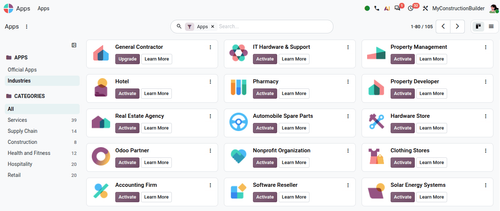
Open an Odoo Industry package and you may notice something unusual: there is almost no Python.
Take construction_developer, Odoo's Property Developer industry. Its __init__.py is effectively empty. Instead, the package contains XML files defining custom fields, views, automations, actions, and other configuration.
The business logic is mostly data, not Python code.
This is a deliberate design choice. It allows Odoo to distribute complete industry configurations that can run on Odoo Online, where traditional custom Python modules cannot be installed, and these modules are designed to even renitiate the database if selected on debug mode.
An Odoo Industry is essentially a packaged Studio configuration
A useful way to think about an Odoo Industry is as a pre-built Odoo Studio configuration distributed as a module.
For example, construction_developer depends on web_studio:
'depends': [
    'base_industry_data',
    'construction',
    'mrp_account',
    'web_gantt',
    'web_studio',
],
Instead of defining most customizations in Python, the Industry creates them as Odoo records.
Custom fields are data
A traditional Odoo module might define a field like this:
class SaleOrderLine(models.Model):
    _inherit = "sale.order.line"

    bom_cost = fields.Monetary()
An Industry can create the field as an ir.model.fields record instead:
<record model="ir.model.fields" id="field_sale_order_line_x_bom_cost">
    <field name="name">x_bom_cost</field>
    <field name="model_id" ref="sale.model_sale_order_line"/>
    <field name="field_description">BOM Cost</field>
    <field name="ttype">monetary</field>
    <field name="store" eval="False"/>
    <field name="related">x_bom_id.x_bom_cost</field>
</record>
The x_ prefix is the convention used by Odoo for custom fields created at runtime.
The field exists in the database rather than being declared by a Python model class.
Business logic can also be data
Industries can contain Python logic, but that does not necessarily mean they contain Python modules.
For example, logic can be stored inside an ir.actions.server record:
<record model="ir.actions.server" id="action_update_product_cost_and_vendor_list">
    <field name="name">Construction Developer: Update Product Cost and Vendor List</field>
    <field name="model_id" ref="product.model_product_product"/>
    <field name="state">code</field>
    <field name="code">
partner_id, qty, price = (env.context.get(k) for k in ('partner_id', 'qty', 'price'))
if supplier_info := env['product.supplierinfo'].search([...]):
    ...
record['standard_price'] = price
    </field>
</record>
A base.automation record can then decide when that action runs:
<record model="base.automation" id="automation_update_product_cost_and_vendor_list_from_purchase_order">
    <field name="model_id" ref="purchase.model_purchase_order"/>
    <field name="trigger">on_state_set</field>
    <field name="filter_domain">[('state', '=', 'purchase')]</field>
    ...
</record>
So there is Python logic, but it is stored as data and executed by Odoo's server-action framework. It is not Python loaded from a custom add-on.
That distinction is important.
Why Odoo does this
The big advantage is that any smal business can start easier on Odoo Online.
Odoo Online does not allow customers to deploy arbitrary Python add-ons to the server. You cannot simply add your own Python module to the add-ons path as you can on Odoo.sh or an on-premise installation.
Industries need to work within that restriction.
By representing custom fields, views, actions, automations, and other configuration as records, Odoo can import an Industry into an existing database without deploying a traditional custom Python module.
This makes Industries particularly useful for businesses that want a ready-made configuration while staying on Odoo Online.
Instead of starting with an empty database, a business can install an Industry and immediately get workflows, fields, views, dashboards, and automations designed for its sector.
For the installation process, see How to Install Odoo Industry Packages (Locally and on SaaS).
Why normal module installation can fail
This architecture also explains why you should not treat an Industry like a normal Odoo add-on.
Putting the Industry repository on --addons-path and running:
odoo-bin -i construction_developer
can result in errors such as:
Field "x_bom_cost" does not exist in model "sale.order.line"
The problem is that fields such as x_bom_cost are created as database records rather than being available from a Python model class when the registry initially loads.
Industries therefore use Odoo's import mechanism instead.
The practical installation process is covered separately in How to Install Odoo Industry Packages
The trade-off
The data-based approach works very well for deployment, but it has consequences when you want to develop heavily on top of an Industry.
You are extending Studio-style customizations
A conventional custom module gives developers Python models, methods, fields, tests, and a codebase designed to be inherited.
An Industry can instead give you:
x_fields created as database records;- server actions containing Python as stored data;
- automated actions controlling when that logic runs;
- views and configuration created through XML records.
You can extend this configuration, but it is different from building on a conventional Python module.
As customization grows, development, testing, debugging, and maintenance can become more difficult.
Limited customizaton eventually becomes the bigger limitation
For a business with relatively standard requirements, this may never be a problem.
The Industry provides the configuration it needs, and additional changes can often be handled through Studio and standard Odoo functionality.
The situation changes when the project requires things such as:
- custom Python models and methods;
- complex integrations;
- controllers;
- external Python libraries;
- substantial backend logic;
- more advanced performance optimization.
At that point, the project will normally need Odoo.sh or an on-premise deployment.
The team may also decide that some Industry customizations should be replaced with conventional Python modules rather than continuing to extend the Studio-style implementation.
Industries are best treated as a starting point
This does not make the Industry approach bad architecture. It solves a specific problem very effectively.
For smaller implementations, Industries provide a fast way to start with a configuration already adapted to a particular type of business.
They are also useful for:
- quickly demonstrating an industry-specific Odoo setup;
- starting an implementation from existing workflows instead of an empty database;
- running vertical solutions on Odoo Online;
- understanding how Odoo approaches a particular industry's requirements.
The important point is to understand what you are installing.
An Odoo Industry is not the same thing as a traditional vertical Python module. It is primarily a packaged set of Odoo configuration and business data.
What happens when the project grows?
You do not necessarily need to replace an Industry simply because the company grows.
If standard Odoo, the Industry configuration, and Studio still cover the requirements, there may be no reason to change anything.
But once significant custom development is required, it is worth reviewing the architecture.
Some Industry configuration may remain useful. Other parts may be better implemented as conventional custom modules on Odoo.sh or on-premise.
The question becomes whether each customization should remain as imported data or move into maintainable application code.
Takeaway
Odoo Industries use data instead of traditional Python modules.
Fields become ir.model.fields records. Business logic can live in server actions. Triggers become automated actions. Views and workflows are imported as configuration.
This makes Industries easy to distribute and install without custom server code.
The trade-off appears when customization becomes more complex. A data-driven Industry is not as natural to extend, test, and maintain as a conventional Python codebase.
For a standard implementation, that may not matter at all. For a heavily customized project, it is something to consider early.
Odoo Industries are therefore best understood as ready-made vertical configurations, rather than traditional vertical applications written in Python.