Cost complex work faster. Make fewer mistakes.
Build nested cost sheets, send work out to subcontractors, and turn the winning estimate straight into an Odoo quotation. No spreadsheets, no separate estimating tool.
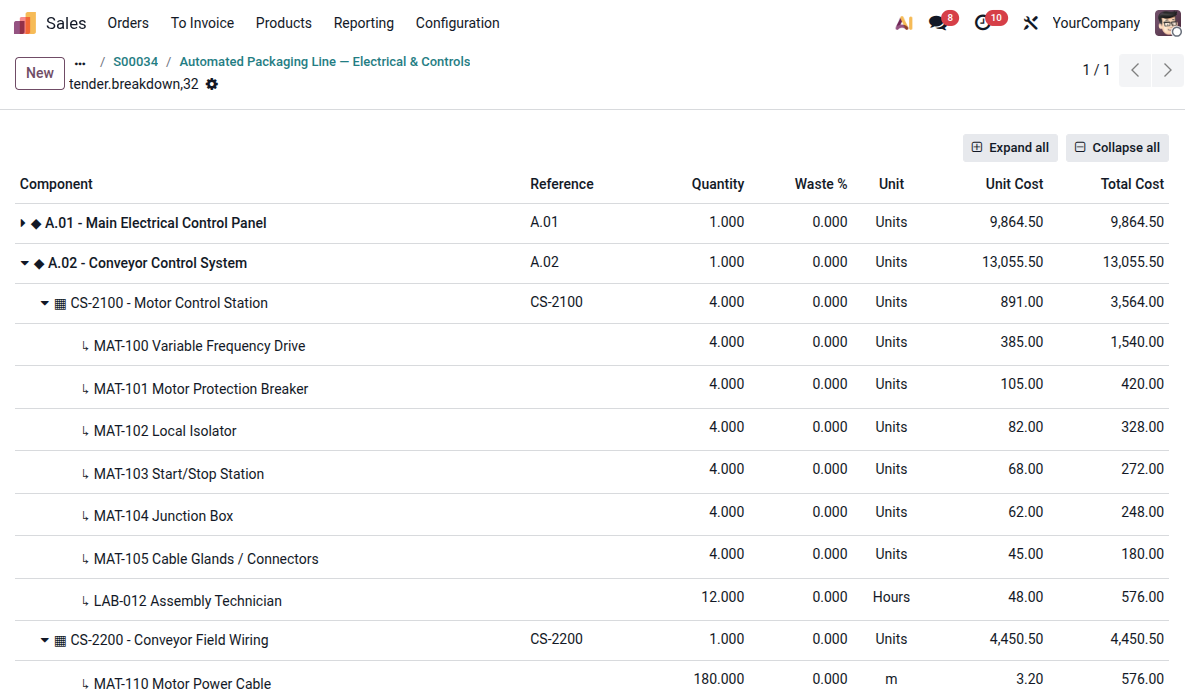
Every tender makes the next one faster and more accurate.
Reusable cost sheets, assemblies and resource libraries mean your estimators copy and adapt instead of starting from a blank sheet. That adds up fast if you keep quoting similar work, equipment and assemblies.
Spreadsheets get you to a number. Then you still have to deliver the job.
Your estimate is disconnected from delivery
The quantities, resources, labour and costs used to price the job aren't connected to the systems used to deliver it.
Winning creates more work
Purchasing, manufacturing, scheduling and project teams have to rebuild information that already existed in the estimate.
You don't close the loop
Without the same cost structure from estimate through delivery, it's difficult to see where you made or lost money — and use that knowledge on the next tender.
One estimate, unlimited depth.
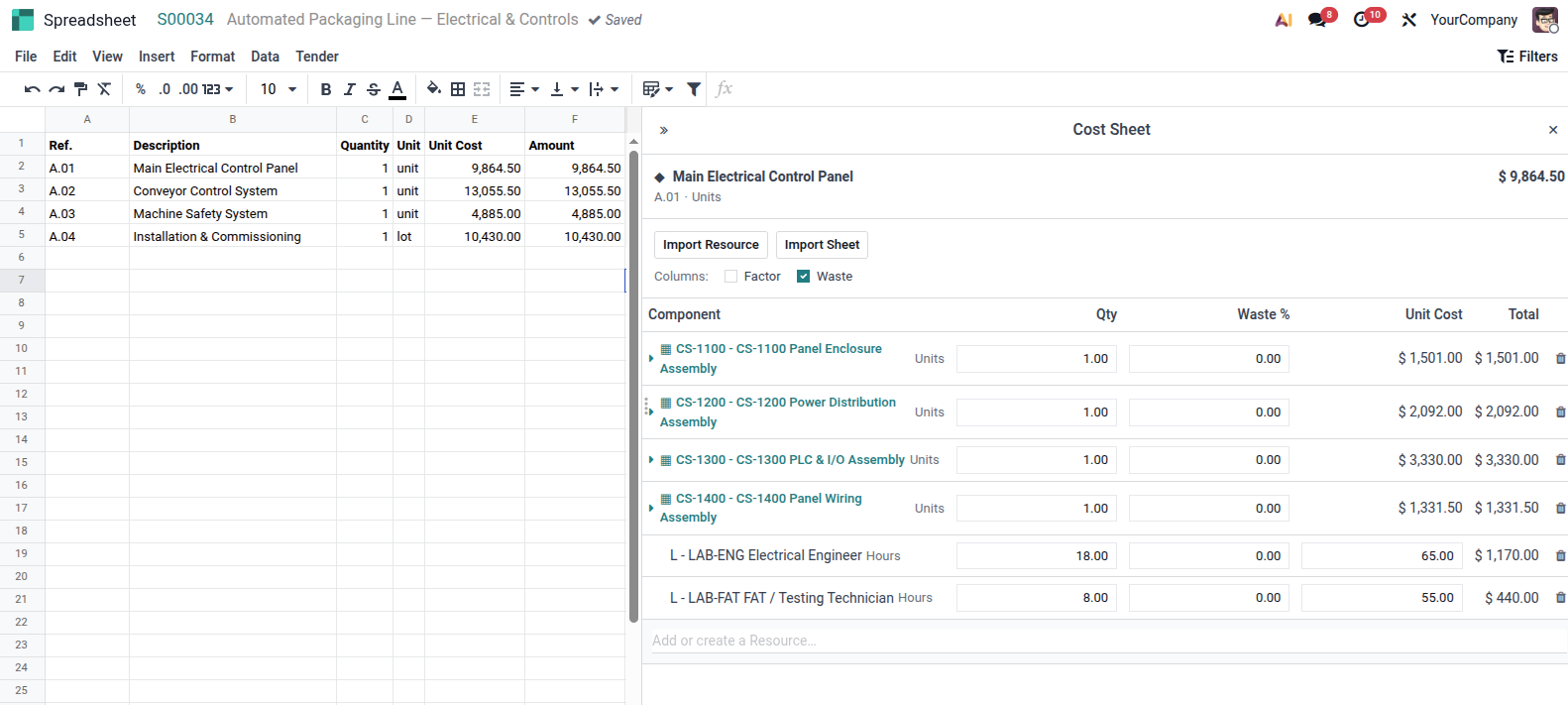
Connected, multi-level cost sheets. Build your estimate in layers, with cost sheets containing other cost sheets. Break complex work down from the overall project into work packages, activities, assemblies and individual resources — while keeping the entire cost build-up connected.
- Detailed cost build-ups.Build each cost sheet from materials, labour, equipment, subcontracting and overheads.
- Resource-based estimating. Cost with estimating resources without cluttering your Odoo product catalogue. Link resources to products only when they're needed for delivery.
- Reuse proven cost sheets. Pull existing cost sheets, assemblies and resources from your shared library instead of rebuilding them from scratch.
Real costs, not list prices.
The quantity of a resource rarely equals the quantity of finished work. Production factors convert resource inputs into output — for example, one day of labour and equipment might produce 50 m² of finished work.
Waste factors account for the difference between what you buy and what gets installed, whether that's steel, timber, flooring, cable or sheet material.
Together, quantity, price, productivity and waste give you a realistic unit cost, calculated through every level of the estimate.
Don't estimate the same thing twice.
Build a costing knowledge base
Every estimated activity, assembly and work package becomes reusable company knowledge, ready for future tenders.
Start from proven work
Copy complete cost sheets or structures into a new tender and adapt them instead of rebuilding the estimate from scratch.
Reuse resources everywhere
Keep materials, labour, equipment, subcontractors and overheads in a shared resource library, ready to use across tenders.
Keep your product catalogue clean
Tender-only resources stay in the estimating library. They only become Odoo products when they're actually needed for delivery.
Get external pricing without leaving the estimate.
Package any part of an estimate for external pricing — specialist work, fabricated components, bought-in equipment, materials or subcontracted services. Issue the package through the Odoo portal, collect completed submissions in the same place and bring returned pricing directly back into your estimate.
Create a bid package
Select the scope, components or resources you want priced and create a self-contained package for a supplier or subcontractor.
Generate the BOQ
Export a clean Excel package containing only the quantities, specifications and scope they need to price.
Issue through the portal
Give each bidder their own portal link to download the package without exposing the rest of your estimate.
Collect submissions through the portal
Suppliers and subcontractors upload their completed pricing through the same portal, keeping submissions connected to the tender.
Bring pricing back into the estimate
Import returned pricing for comparison and final costing.
Speak the language the industry already uses.
Export structured pricing and quantities to Excel for customers, uppliers and other stakeholders — and bring external pricing back in using the same familiar format.
- Flexible Excel & BOQ exports. Generate clean quantities and pricing in a familiar spreadsheet format for customers and other external parties.
- Work with existing templates. Copy and paste pricing into customer-supplied BOQs, schedules and pricing sheets without rebuilding the estimate.
- Keep your cost build-up private. Share quantities and selling prices without exposing the detailed resources, costs and margins behind them.
| Ref | Description | Qty | Unit | Price |
|---|---|---|---|---|
| A.01 | Main Electrical Control Panel | 1 | unit | 9,864.50 |
| A.02 | Conveyor Control System | 1 | unit | 13,055.50 |
| A.03 | Machine Safety System | 1 | unit | 4,885.00 |
| A.04 | Installation & Commissioning | 1 | lot | 10,430.00 |
Turn detailed costs into the right selling price.
Markup by resource type
Apply different margins to materials, labour, equipment and subcontracting rather than one blanket markup across the whole estimate.
From estimate to quotation
Once the estimate is approved, calculated selling prices flow directly into the Odoo quotation while the detailed cost build-up stays behind the scenes.
Win the tender. Continue in Odoo.
Once a tender is awarded, the quotation becomes the starting point for execution, using Odoo's own project, sales, purchasing, timesheet, analytic accounting and profitability tools. The tender doesn't have to live in a disconnected estimating app: the commercial data carries straight into the operational system.
Built for teams that tender complex, bespoke work.
Questions estimators actually ask.
Still deciding? Bring a real tender and we'll show you the cost sheet behind it.
Do I need to turn every cost item into an Odoo product?
No. Estimate using resources such as materials, labour, equipment, subcontracting and overheads. Only resources needed for delivery need to be linked to Odoo products.
Can suppliers or subcontractors see my whole estimate?
No. Each bidder receives their own package through the Odoo portal and only sees the scope and information you've chosen to share.
How do suppliers and subcontractors return their pricing?
They download their package through the Odoo portal and upload their completed pricing through the same portal, keeping submissions connected to the tender.
What happens to the estimate when we win?
The estimate doesn't become a dead end. Selling prices flow into the Odoo quotation, while the information behind the estimate can support purchasing, projects, manufacturing, timesheets and profitability during delivery.
Can we still work with customer Excel files and BOQs?
Yes. Export structured quantities and pricing to Excel, or copy pricing into customer-supplied BOQs and pricing sheets without exposing your internal cost build-up.
Is this a separate estimating system bolted onto Odoo?
No. Cost sheets, resources, pricing and quotations are connected within Odoo, so estimating can form the starting point for delivery rather than sitting in a separate system.
Ready to see your own tenders costed this way?
Bring a real tender and we'll show you the cost sheet behind it.