
<p>
  Just imagine, to have a full blown ERP that is open and integration
  friendly
</p>
<p>
  <b>
    Odoo can manage all your business for you: from collecting payments,
    handling shipping and to connect with your third party service providers
    with full control.
  </b>
</p>
    <h2>Payment Gateways</h2>
    <p>
      If you have a specific payment gateway provider and you need your
      statement in Odoo or if perhaps you need to use Odoo to connect to
      these payment providers. We can do it!
    </p>
    <div>
      <a class="btn btn-odoogap--secondary btn--large"href="/contactus/">Discover more</a>
    </div>
  </div>
  <div>
    <img
      src="https://cdn.erpgap.com/blog_117_unsplash_Xv_Su_K_Uo_Uaopayjpegaccesstoken0a469b7bebba4c68a8919921b2a1eb6c_1b430b358d.jpg"
      alt="Odoo Integration Services blog 1"
    />
  </div>
</div>
Shipping Providers
Just the same, if you have a shipping provider that provide an open API, we can as well integrate with Odoo so that daily tasks are just simple for your staff to accomplish.Just imagine, pick a Delivery Order, put in pack then press a button, print a label and stick that on the box. Next round your provider has all the info of the shipping that was placed when you got that order from you sales staff or your Odoo website.

3PL - Third Party Logistics
Integrating your website (Odoo or other) with Odoo to mediate the connection with your third party logistics provider/ fulfillment warehouse provider is also a common scenario.
Just imagine, orders are brought from your website to Odoo, here you can create rules from where to ship your products and automatically or manually send that information to respective warehouses. Using Odoo you will be able to know exactly your stock levels in each 3PL, together with inventory valuation and other information you need.

If there is an API or a database connection we can access we can integrate it with Odoo
    <a
      class="btn btn-odoogap--secondary btn--large"
      href="/contactus/"
    >Just Contact us</a>
  </div>
</div>
Keep reading
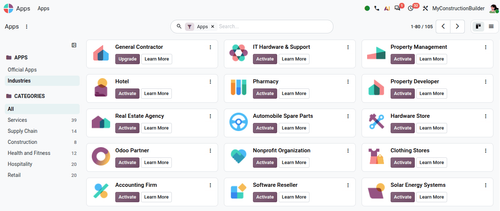
How to Install Odoo Industry Packages
A practical, step-by-step guide to installing Odoo Industry packages as imported data modules: local workflow with run_industry.sh, building the ZIP, and uploading it on Odoo Online.
 Diogo Duarte
· Sep 29, 2026
Diogo Duarte
· Sep 29, 2026 
Top 5 New Features in Odoo 20 for a More Connected Business
Explore Odoo 20 features across Sales, Project, Planning, Timesheets and Website, and see how a connected ERP can reduce manual work and improve visibility.
 Adriana Duarte
· Sep 25, 2026
Adriana Duarte
· Sep 25, 2026 
Why Odoo Industries Are Data, Not Code
Odoo Industry packages ship business logic as records: server actions, automations, and Studio x_ fields instead of Python. This is what makes them installable on Odoo Online, and also what makes them hard to build on.
Diogo Duarte
· Sep 23, 2026