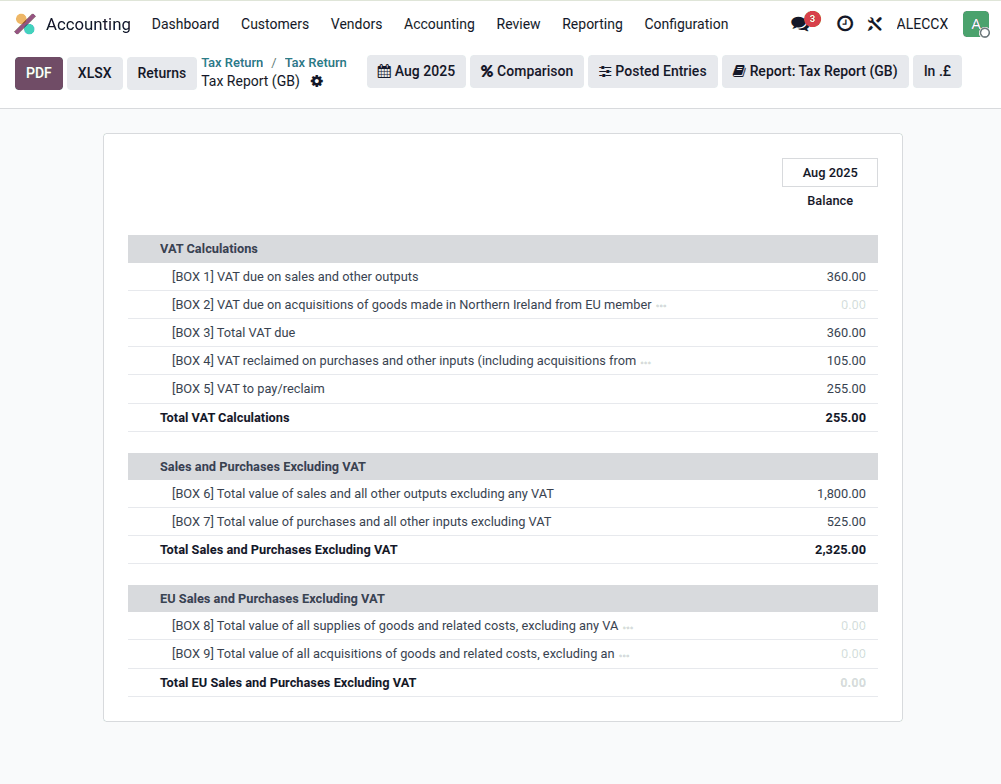
Odoo 19 introduces a new way of handling Making Tax Digital (MTD) VAT submissions for UK businesses. The new tax return object in version 19 not only simplifies the submission process but also gives accountants and finance teams more control and visibility over what is being reported to HMRC.
In this article, we’ll walk through how the new tax returns work in Odoo 19, from preparing a return, validating anomalies, and submitting to HMRC, to reviewing past submissions.
Navigating to Tax Returns
Inside the Accounting app, a new Tax Returns section centralizes VAT reporting. For each period (monthly or quarterly, depending on company configuration), you’ll see the prepared VAT return ready for validation and submission.
When opening a return, you can:
- View all nine VAT boxes required by HMRC.
- Drill down into each box to see the detailed transactions behind the totals.
- Identify anomalies such as missing PDF attachments for vendor bills or invoices.
Fixing Anomalies Before Submission
Odoo 19 introduces a clear anomaly detection mechanism. For example, if a vendor bill is missing its supporting document, Odoo flags it directly in the VAT return.
From the VAT return view, you can quickly open the bill, upload the missing PDF, and return to the report. Once resolved, Odoo updates the return automatically, ready for validation.
Validation and Submission
Once all anomalies are cleared, you can validate the tax return. After validation, Odoo 19 allows you to:
- Submit the VAT return directly to HMRC.
- Mark the return as paid.
- Keep track of the submission status in one central dashboard.
This ensures a perfect workflow from preparation to compliance.
Handling Back-Dated Transactions
Odoo 19 also addresses one of the most common accounting pitfalls: invoices or bills entered with dates prior to the VAT return lock date.
For example, if you receive a vendor bill dated 14th August but the August VAT return has already been submitted, Odoo automatically shifts the transaction into the next available VAT period.
The system also provides a clear warning message so accountants are aware of the adjustment and can attach the relevant PDF document for audit purposes.
Reviewing Historical VAT Returns
After submission, you can always go back and review past returns. Odoo 19 provides:
- A list of all previously submitted VAT returns.
- Drill-down access to each box to see which invoices and bills were included.
- Cross-checks between the accounting date and the VAT return period, ensuring accuracy and auditability.
This makes it easier for businesses to respond to HMRC queries or internal audits with confidence.
Watch the Demo
To see the full walkthrough in action, watch our video:





